
Settings
Every key in KovaAdminTools_Config.json, grouped the way the panel shows them. All of them are live within a minute.
On this page
Where they live
The file is KovaAdminTools_Config.json in the KovaAdminTools folder of the server profile. Edit it with any text editor; it is plain JSON, and the mod writes a KovaAdminTools_Config.example.json beside it with every key at its default. On a KOVA server the panel’s Admin Tools tab shows the same settings as a form, so you never need to open the file.
Note. Every setting is live: the mod re-reads the file about once a minute, and
#kova reloadreads it now. The one exception istierCapabilities, which is read at start.
The Settings page in game carries the switches staff flip most often, plus the jail location, the safe zone actions and your menu choice.
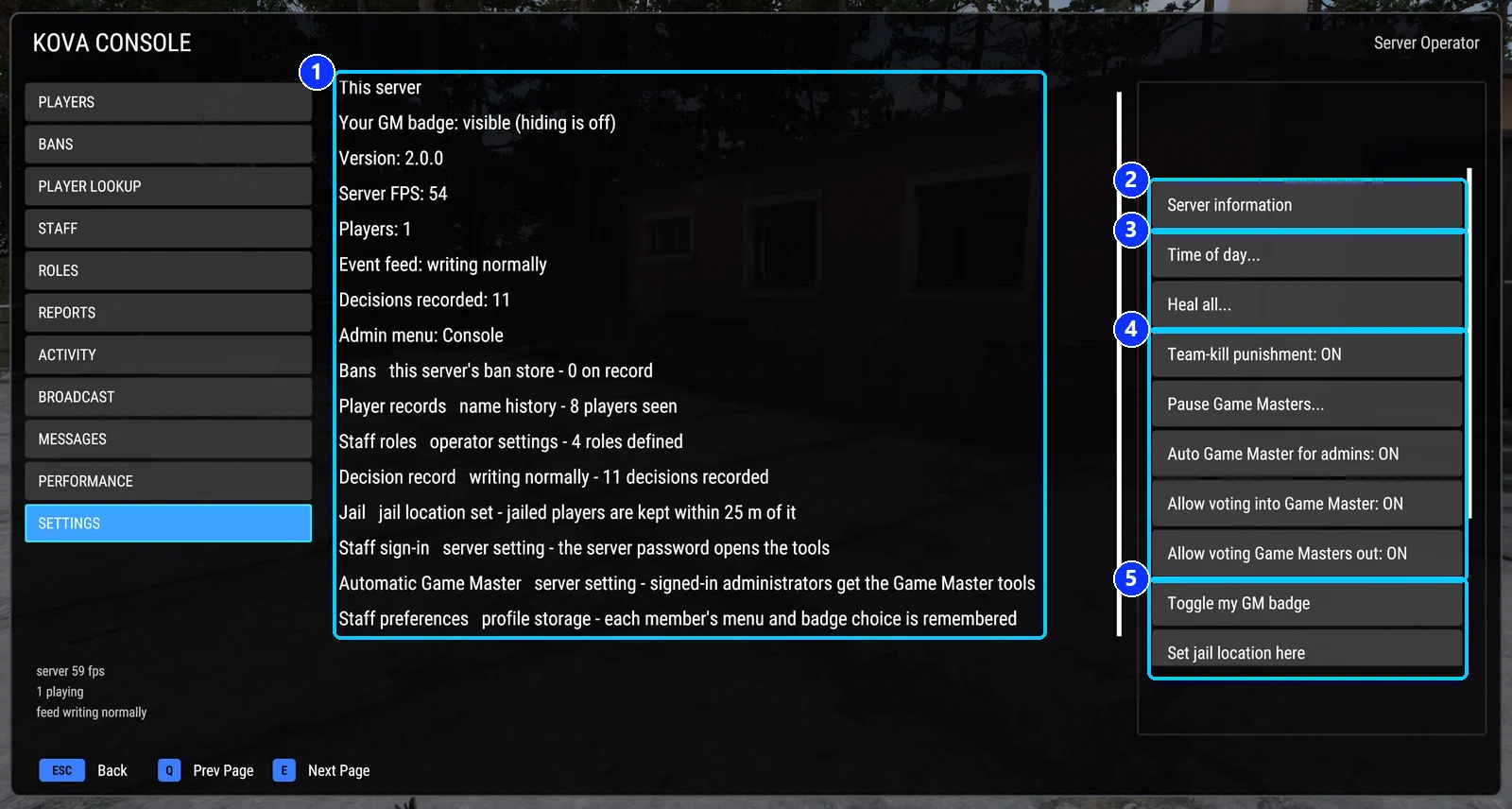
- This server: the mod's own state, one line each. Version, server frame rate, the event feed, the decision record, the roles, the jail, how staff sign in, automatic Game Master and where preferences are kept.
- Server information, the notice players read when they join.
- Time of day and Heal all.
- The switches staff flip most often. Each button shows its current state and flips it on press.
- Your own badge, the jail location, and below them the safe zone actions and your menu choice.
Server information
| Key | Type | Default | What it does |
|---|---|---|---|
serverInfoText |
text | empty | The notice players read when they join and from the Server information button. |
kovaMotdAutoOpen |
on/off | on | Show the notice when players join. Off: only from the button. |
kovaMotdEveryJoin |
on/off | off | Show it on every join, even if unchanged. |
kovaMotdWaitForSpawn |
on/off | on | Wait until the player has spawned. |
Welcome and chat
| Key | Type | Default | What it does |
|---|---|---|---|
welcomeMessage |
text, 300 | empty | One chat line when a player joins. |
kickMessage |
text, 300 | empty | Shown to a kicked player in chat and on the disconnect screen. |
banMessage |
text, 300 | empty | Shown to a banned player in chat and on the disconnect screen. |
appealUrl |
text, 300 | empty | Link added to the kick and ban messages. |
announcements |
list, up to 20 | empty | Messages every 5 to 1440 minutes, or at clock times. Each has text, everyMinutes, at and paused. |
announcementClock |
local or utc |
local |
Clock for the set times. |
warningDisplaySeconds |
0 to 60 | 0 | How long a warning stays on screen. 0 = from its length. |
broadcastDisplaySeconds |
0 to 60 | 0 | How long a broadcast or clock-time announcement stays on screen. 0 = from its length. |
Access control
| Key | Type | Default | What it does |
|---|---|---|---|
enableAutoAdminLogin |
on/off | off | Players on the administrators list get the admin role when they join, and each admin gets an opt-out switch on the Settings page. |
enableAutoGameMasterForAdmins |
on/off | off | Admins get the Game Master editor when they join. |
enableGameMasterVoteIn |
on/off | on | Off: players cannot vote themselves into Game Master. |
enableGameMasterVoteOut |
on/off | on | Off: players cannot vote a Game Master out. |
allowServerAdminLogin |
on/off | on | The server admin password, and the server’s administrator list, open the tools. |
enableNativeBackendBan |
on/off | on | A ban is also registered with the game’s own ban service. |
kickUnverifiedIdentities |
on/off | on | Reserved. Nothing in this version acts on it. |
nativeAdminRole |
role key | admin |
The role a password sign-in, or a listed administrator, counts as. |
gmGrantRole |
role key | gamemaster |
The role a player receives when given Game Master. |
enableAutoRank |
on/off | off | Listed players get their minimum Conflict rank after joining a faction. |
autoRanks |
map | empty | Player ID to rank word. |
Roles and permissions
| Key | Type | Default | What it does |
|---|---|---|---|
roles |
list | the four starting roles | Each role: key, displayName, rank (1 to 599), members, permissions, chatTag (16), chatColor. See Roles and permissions. |
tierCapabilities |
map of lists | empty | What a role with nothing ticked can do, by its place on the ladder: owner, admin, moderator, gameMaster. Read at start. |
Feature toggles
| Key | Type | Default | What it does |
|---|---|---|---|
enableEventLogging |
on/off | on | Write admin events to the server log. |
gmPlacementSpacingMs |
0 to 10000 | 3000 | Wait between a Game Master’s group or vehicle spawns. 0 = off. |
jailRadiusMeters |
5 to 500 | 25 | How far a jailed player can move before being pulled back. |
jailProtectsFromDamage |
on/off | on | Jailed players cannot take damage. |
enableHqSafeZone |
on/off | off | Players near their own HQ cannot take damage. Conflict only. |
hqZoneRadiusMeters |
5 to 500 | 30 | How far the HQ zone reaches. |
enableSafeZones |
on/off | on | Staff can place safe zones. |
safeZoneDefaultRadiusMeters |
5 to 500 | 50 | Radius of a new zone. |
baseExplosiveRadiusMeters |
0 to 1000 | 200 | A mine or charge this close to a spawn point is flagged to staff. 0 = off. |
idleKickMinutes |
0 to 240 | 0 | Remove idle players after this many minutes. 0 = off, shortest 3. |
safeZoneProtectVehicles |
on/off | on | Vehicles inside a zone cannot be damaged. |
safeZoneRemoveExplosives |
on/off | on | Grenades and smoke thrown from inside a zone are removed. |
zoneNotices |
on/off | on | Tell players in chat when they enter or leave a zone. |
enableCombatEventLog |
on/off | on | Also print grenade, smoke and explosive lines to the server console. |
Event recording
All on by default. Turning one off keeps that family off the Activity page and out of the server log. Kicks, bans, warnings, admin logins and Game Master grants are always written to the record file whatever the switch says.
| Key | Records |
|---|---|
recordJoin |
Player joins. |
recordLeave |
Player leaves and the reason. |
recordNameChange |
Name changes against the same player ID. |
recordKick |
Kicks. |
recordBan |
Bans, unbans, and bans running out. |
recordWarn |
Warnings. |
recordAdminLogin |
Admin sign-ins and sign-outs. |
recordGameMaster |
Editor sessions, and Game Master given, taken, blocked or allowed. |
recordKill |
Kills, deaths and suicides. The busiest; switch it off first if the log grows too fast. |
recordFriendlyFire |
Team kills and friendly fire. |
recordGmPlayerActions |
A Game Master neutralising or deleting a player. |
recordExplosives |
Explosives placed and set off. |
recordBroadcast |
Broadcasts and announcements. |
recordSecurity |
Refused requests, banned names returning, explosives near a spawn. |
recordAdminAction |
Reloads, cleanups, teleports, settings changes, notes, faction and squad changes. |
recordVote |
Votes and their outcome. |
recordEntityPlaced |
What a Game Master spawns and where. |
recordGameEnd |
Each match ending and the winner. |
recordPlayerReport |
Player reports and requests. |
recordRankChange |
Conflict rank changes. |
quietConsoleEvents |
A list of event names to keep in the record but off the server console and off the Activity page’s default view. |
Event names for quietConsoleEvents
join, leave, name_change, kick, ban, unban, warn, admin_login, gm_grant, gm_revoke, gm_deny, gm_undeny, tier_grant, tier_revoke, gm_enter, gm_exit, gm_session, kill, team_kill, death, suicide, friendly_fire, explosive_placed, explosive_detonated, grenade_thrown, broadcast, security, admin, vote, entity_placed, game_end, jail, jail_release.
Server diagnostics
Warnings written to the server log only. A problem is reported when it begins, repeated every diagRepeatMinutes while it lasts, and reported once more when it clears.
| Key | Type | Default | What it does |
|---|---|---|---|
diagnosticsEnabled |
on/off | on | Master switch. |
diagLowServerFps |
0 to 240 | 30 | Warn when server FPS falls below this. 0 = off. |
diagRepeatMinutes |
0 to 1440 | 5 | How often an ongoing problem is repeated. 0 = once. |
diagServerHitchMs |
0 to 60000 | 0 | Warn when the server freezes longer than this. 0 = off. |
diagHighPingMs |
0 to 10000 | 0 | Warn when a player’s ping passes this. 0 = off. |
diagEntityGrowth |
0 to 10000000 | 0 | Warn when loaded entities have grown by this much since start. 0 = off. |
diagAiCapWarnings |
on/off | off | Warn while AI is at the server’s limit. |
diagPerfHeartbeatMinutes |
0 to 1440 | 0 | Write a routine performance line at this interval. 0 = off. |
Identity
| Key | Type | Default | What it does |
|---|---|---|---|
schemaVersion |
number | 7 | The settings format version. A newer file is refused and the last good one used. |
serverId |
text | empty | Names this server in the audit record. If empty, the mod names it on the first start. |
Covers KOVA Admin Tools 1.0.58. Updated October 6, 2026.