
Files and records
Everything the mod keeps lives in one folder. Nothing is ever overwritten blindly, and every decision is written down.
On this page
The folder
Everything is in KovaAdminTools inside the server profile.
| File | What it holds |
|---|---|
KovaAdminTools_Config.json |
The settings. The file you or the panel edit. |
KovaAdminTools_Config.example.json |
The shipped defaults, written once. |
KovaAdminTools_Config.last-good.json |
The last settings that loaded cleanly. |
KovaAdminTools_Manifest.json |
A description of every setting for the panel, the mod version, and how the settings loaded. |
KovaAdminTools_Heartbeat.json |
The time the mod was last running. |
KovaAdminTools_Roles.json |
The roles as the server reads them, with members and permissions. |
KovaAdminTools_RoleDefinitions.json |
Roles created or edited in game. |
KovaAdminTools_Access.json |
Roles given in game and Game Master blocks. |
KovaAdminTools_StructuredBans.json |
The bans. |
KovaAdminTools_Jail.json |
The jail location and who is jailed. |
Zones.json |
Staff-placed safe zones. |
KovaAdminTools_Names.json |
Every player the server has seen, with names, name history and visits. |
KovaAdminTools_Reports.json |
Player reports. |
KovaAdminTools_Requests.json |
Requests for an admin. |
KovaAdminTools_Decisions.json |
The staff decision ledger. |
KovaAdminTools_DecisionEvents.ndjson |
Every staff decision, one line each, append only. |
KovaAdminTools_Audit.ndjson |
The activity record, one JSON line per event. |
KovaAdminTools_Audit.pending.ndjson |
Lines queued when the server stopped, read back on the next start. |
KovaAdminTools_AuditSequence.json |
The record’s numbering, in two copies. |
KovaAdminTools_Messages.json |
Message edits made in game. |
KovaAdminTools_MotdReads.json |
Who has read which server information text. |
KovaAdminTools_StaffPrefs.json |
Each staff member’s menu and badge choice. |
KovaAdminTools_Staff.json |
Connected staff right now, for the panel. |
KovaAdminTools_LiveSettings.json |
Switches changed in game. |
KovaAdminTools_Inbox.json |
Commands from the panel. |
KovaAdminTools_Inbox.receipts.json |
The result of each panel command. |
KovaAdminTools_InboxCheckpoint.json |
How far through the panel’s commands the mod has got. |
Notes/<player ID>.json |
Staff notes on one player. |
Most stores keep a .last-good.json copy beside them.
When a file is damaged
The mod never overwrites a file it could not read.
- Settings file missing. The last-good copy is used. If there is none, fresh defaults are written.
- Settings file unreadable, or from a newer mod version. It is copied aside with a timestamp and the last-good copy is used.
- A role is malformed. Every readable role is kept; the bad one is skipped and named in the server log.
- A store was left half-written. Before any write the mod keeps a verified copy of the old bytes beside the file. If the write fails, the old bytes come back. If such a copy is still there at the next start, it is read instead and the file is not written until somebody deals with it.
- The ban store is unreadable. Existing bans still hold; no ban can be added, edited or lifted until the warning clears.
- Name history unreadable. It is set aside and a fresh one starts. Returning players may not be recognised until it rebuilds.
Warning. Never delete a
.corrupt.*or.recovery.jsonfile before sending it to support. They are the last bytes anybody verified, and a repair works from them.
The activity record
Every event is a line in KovaAdminTools_Audit.ndjson: a sequence number, the time, the server ID, who acted, who it was about, the reason, the duration and the source. The Activity page shows the newest 256; the file keeps everything.
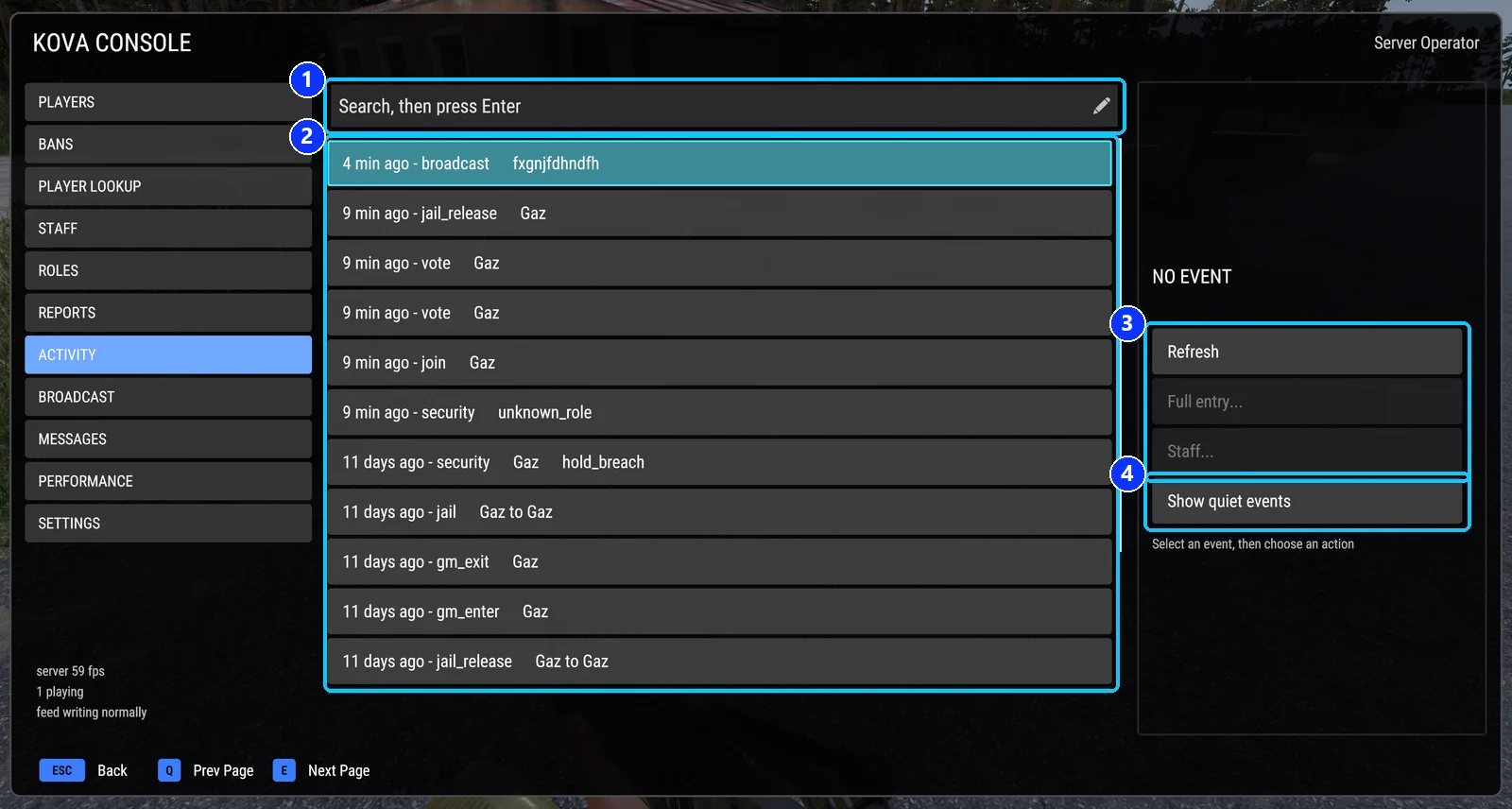
- Search. Press Enter.
- The events, newest first: when, what, who.
- Refresh, Full entry... for the whole record, and Staff... for the player in it.
- Show quiet events: the ones kept off the page by default.
| Button | What it does |
|---|---|
| Refresh | Re-reads the list with the current search. |
| Full entry… | Opens the selected event with every line the record has. |
| Staff… | Opens the Staff page with the player the event is about picked. |
| Show quiet events | Includes events hidden by the quietConsoleEvents setting. |
Kicks, bans, warnings, jail, Game Master grants and admin sign-ins are always written, whatever the recording switches say. The switches decide whether a family shows on the page and in the server log; everything else they govern outright.
Refused requests are evidence too: a refused menu request is printed to the server log directly, and refusals from the menus, chat and Game Master actions are recorded as security events.
If the record cannot be written, lines wait in memory and nothing is dropped while the server runs. Lines still waiting at shutdown go into KovaAdminTools_Audit.pending.ndjson and are read back on the next start.
Server diagnostics
With diagnosticsEnabled on, the mod watches the server once a minute and writes a warning to the server log, prefixed KOVA server watch:, when a threshold is crossed: low server FPS, a stall, high ping (naming the player), entity growth since start, or AI at its limit. Thresholds are in Settings.
How the panel talks to the mod
Entirely through files in this folder. The mod opens no connection to a panel; its only calls outside the game are to the game’s own ban service and its server administrator list.
| The mod writes | The panel uses it for |
|---|---|
Manifest.json |
Drawing the settings form; the mod version and settings health. |
Heartbeat.json |
Knowing the mod is alive. |
Roles.json |
The roles list and who can hand out Game Master. |
Staff.json |
Who is on with what access. |
StructuredBans.json |
The bans list. |
Audit.ndjson |
The activity feed and Discord posts. |
Inbox.receipts.json |
Whether a panel command was carried out. |
| The panel writes | The mod reads it |
|---|---|
Config.json |
About once a minute, and on #kova reload. |
Inbox.json |
About every five seconds. |
The inbox takes eight kinds of command: broadcast, kick, ban, unban, reload, give Game Master, take Game Master, and cleanup. Every command gets a receipt, the intent is recorded before it runs, and a command already carried out is never repeated. Panel commands are not rank-checked, but they still cannot touch a protected owner.
Covers KOVA Admin Tools 1.0.58. Updated October 6, 2026.