
Server tools
The things that keep a server running smoothly between the bans. Most live on the Settings and Performance pages.
On this page
Heal
Select a player on Players and press Heal…. Choose Selected player or Everyone. From chat: #kova heal 3, #kova healall, or the short forms #heal 3 and #healall. Needs Heal players.
Healing is care, not a sanction: it ignores rank and works on yourself. Nobody dead or downed is revived. The answer is <name> has been healed. or <name> needed no healing.; an everyone order counts N healed, N needed nothing, N could not be.
Teleport
Teleport… on Players offers three choices. Teleport me moves you to the player (needs Teleport to a player). Bring Here moves the player to you. Move GM camera moves your Game Master camera to them (needs Move the Game Master camera). From chat: #kova teleport 3 and #kova bring 3.
Time of day
Time of day… on Settings offers Dawn (05:30), Noon (12:00), Dusk (18:30) and Night (23:00). From chat you can set any time: #kova time 14:30 or #time dusk. Needs Edit server information. The change is not kept for the next start, and a scenario that does not allow it answers This scenario does not let the time be set.
Safe zones
A safe zone is a sphere nobody can be harmed in. Typical uses are a spawn area or a trading post on a public server. Needs Manage safe zones.
- Stand at the centre.
- On Settings, press Add safe zone here… and confirm. The radius is the
safeZoneDefaultRadiusMeterssetting, 50 metres by default (5 to 500). - To remove one, stand inside it and press Remove safe zone here…. Clear all safe zones… removes every zone on this world.
A world holds up to 32 zones. They are saved and come back after a restart, and each scenario has its own set.
| Setting | Default | What it does |
|---|---|---|
enableSafeZones |
on | Turns staff-placed zones off without deleting them. |
safeZoneProtectVehicles |
on | Vehicles inside cannot be damaged either. |
safeZoneRemoveExplosives |
on | Grenades and smoke thrown from inside a zone are removed. |
zoneNotices |
on | Players are told in chat when they enter or leave: Safe zone: you cannot be harmed here. |
enableHqSafeZone |
off | Conflict only. Players near their own faction’s HQ cannot be harmed, within hqZoneRadiusMeters (30). |
Conflict ranks
The Ranks page lists every connected player with the rank they wear and their faction. Promote and Demote move one step; Set rank… picks any rank the faction offers; Rank all… sets everyone online at once. Needs Set ranks.
The page appears on scenarios that award ranks, such as Conflict, whether or not you have picked a side yourself. On a scenario without ranks, such as a Game Master world, it is not offered.
From chat: #kova rank 3 SERGEANT, #kova rankall PRIVATE, #kova promote 3, #kova demote 3, or the short forms #rank, #rankall, #promote, #demote. The rank words are RENEGADE, PRIVATE, CORPORAL, SERGEANT, LIEUTENANT, CAPTAIN, MAJOR, COLONEL, GENERAL and CUSTOM1 to CUSTOM10.
Read the answer: when a scenario prices two ranks the same, a player can land on the other one, and the answer says so.
To give listed players a minimum rank automatically whenever they pick a faction, set enableAutoRank on and list them under autoRanks:
"enableAutoRank": true,
"autoRanks": {
  "0123abcd-4567-89ef-0123-456789abcdef": "SERGEANT"
}
A higher rank they already earned is kept. This grants no staff permissions.
Factions, squads and Commander
Chat only in this version.
| Command | What it does | Needs |
|---|---|---|
#kova faction 3 USSR |
Moves a connected player to another side; it shows when they next spawn. | Change a player’s faction |
#kova squads |
Lists every squad with anybody in it: number, faction, name, size, leader. | See and disband squads |
#kova squad disband 2 |
Takes everyone out of that squad. | See and disband squads |
#kova commander give 3 |
Makes a player their side’s Commander, replacing whoever holds it. | Give and remove Commander |
#kova commander take 3 |
Removes them as Commander. | Give and remove Commander |
Everyone affected has to be ranked below you.
Idle players
With idleKickMinutes above 0 (off by default; the shortest setting is 3), a player who has not moved or looked around for that many minutes is removed. Two minutes before, they are told You have been idle for N minutes. Move, or you will be removed from the server. Staff and Game Masters are never removed, and a player waiting to spawn gets twice as long. The Players page shows each player’s idle time.
Explosives near a spawn
With baseExplosiveRadiusMeters above 0 (200 by default), a mine or charge placed or set off within that distance of any spawn point is flagged to staff as a security event in the activity record, with the grid square, the distance and who did it.
Performance and cleanup
The Performance page shows the server’s own frame rate and the average ping over the last three minutes, the player count, active AI against its limit, loaded entities, uptime, the three players with the lowest frame rate, and how much battlefield garbage the world is holding.
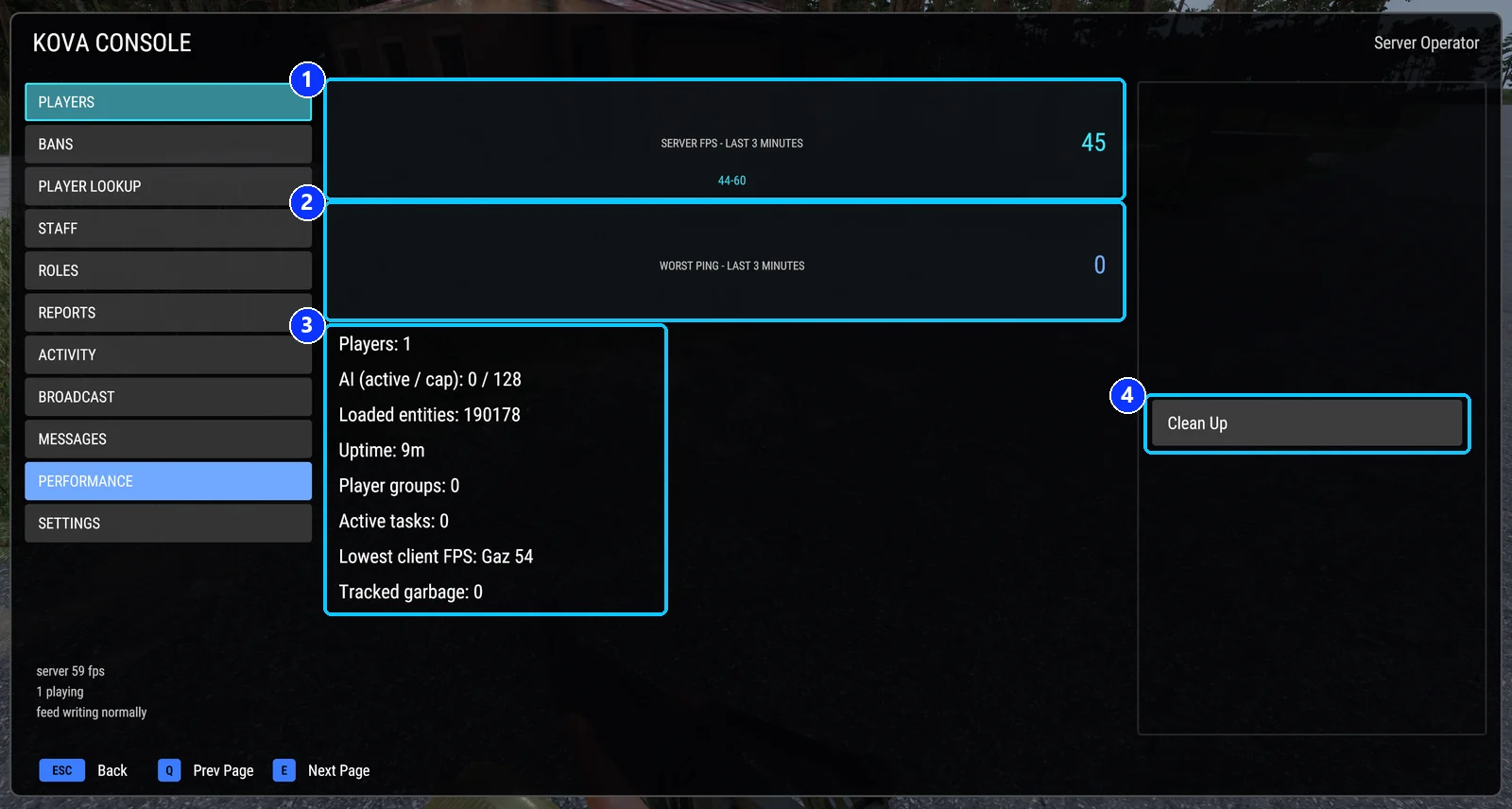
- Server FPS over the last three minutes, with the range.
- Worst ping over the last three minutes.
- Players, AI, loaded entities, uptime, groups, tasks, the lowest client FPS, and tracked garbage.
- Clean Up: remove wrecks and dropped items.
Clean Up asks the world to dispose of every tracked wreck, body and dropped item, after confirmation, and tells you how many it disposed of. Needs Clean up wrecks and drops. From chat: #kova cleanup.
For a quick read in chat, #kova info hour summarises the last hour: lowest and average FPS, the worst ping, the most players, and the five worst minutes.
Team-kill punishment
The Team-kill punishment switch on Settings flips the scenario’s own punishment for this session, where the scenario has one. Needs Edit server information.
Covers KOVA Admin Tools 1.0.58. Updated October 6, 2026.