
Players and bans
Most of a staff member's evening happens on three pages. Select a player, press a button, read the answer.
On this page
The Players page
Everyone connected, searchable by name. Players the server has flagged are listed first.
Each row shows the name, then the live figures the server has for that player (ping, packet loss, their own frame rate, how long they have been idle), a marker if they are jailed or their identity is not verified, and their kills, deaths and team kills. Your own row carries a you tag.
Select a row and the card on the right fills in. With Read player records you get the full record; otherwise the name and current state.
| Button | Needs | What it does |
|---|---|---|
| Kick | Remove players from the server | Asks to confirm, then removes them. They can rejoin. |
| Ban | Ban players | Opens the ban dialog, below. |
| Warn | Warn players | Opens a text box. The player gets a warning at the top of their screen to acknowledge. A reason is required. |
| Staff… | See the staff list | Opens the Staff page with this player picked. |
| Teleport… | Teleport to a player | Offers Teleport me, Bring Here and Move GM camera. |
| Jail… | Jail players | Opens the jail dialog, below. Reads Release jail when they are already jailed. |
| Heal… | Heal players | Heals the player, or everyone. See Server tools. |
Warn
Warn sends a warning the player has to acknowledge. If they are offline it waits for their next visit and expires after 30 days. From chat: #kova warn 3 Stop shooting your own side. Warn All on the Broadcast page sends one to everybody.
Kick
Kick asks Kick the selected player from the server? and removes them. From chat you can add a reason: #kova kick 3 Asked to leave.
Ban
A ban removes the player and keeps them out until it runs out or staff lift it. A reason is always required.
- How long: 30 minutes, 1 hour, 1 day, 1 week, or Permanent.
- Ready-made reasons you can click into the box: Cheating, Toxicity, Team killing, Exploiting, Ban evasion, AFK.
- The reason box. Empty is refused.
- How many warnings this player already has on record.
From chat, the duration is in minutes and 0 means no end date: #kova ban 3 1440 Cheating.
Note. The decision is written to the record before anything happens, so a ban is never carried out without a record of it.
What the banned player sees
- If you set a ban message, it arrives as a chat line.
- A dialog titled Removed from the server shows the reason and your appeal message.
- Three seconds later the game removes them.
- Their disconnect screen reads Banned from the server with the reason. There is no reconnect button.
The appeal message and link are the banMessage, kickMessage and appealUrl settings.
Bans that stick
Bans are kept in the mod’s own files and enforced the moment a banned player’s identity is confirmed, on this run and every later one. On a dedicated server the ban is also registered with the game’s own ban service, so it holds even if the mod is removed later. Lifting a ban removes both.
When a banned name comes back
If somebody joins from a different account under a name a banned player used, nothing happens to them, because a name proves nothing. Every staff member online with Ban players gets one chat line saying so, and the activity record gets a security event.
The Bans page
Every ban on record. Bans in force first, then bans that ran out, which stay as history.
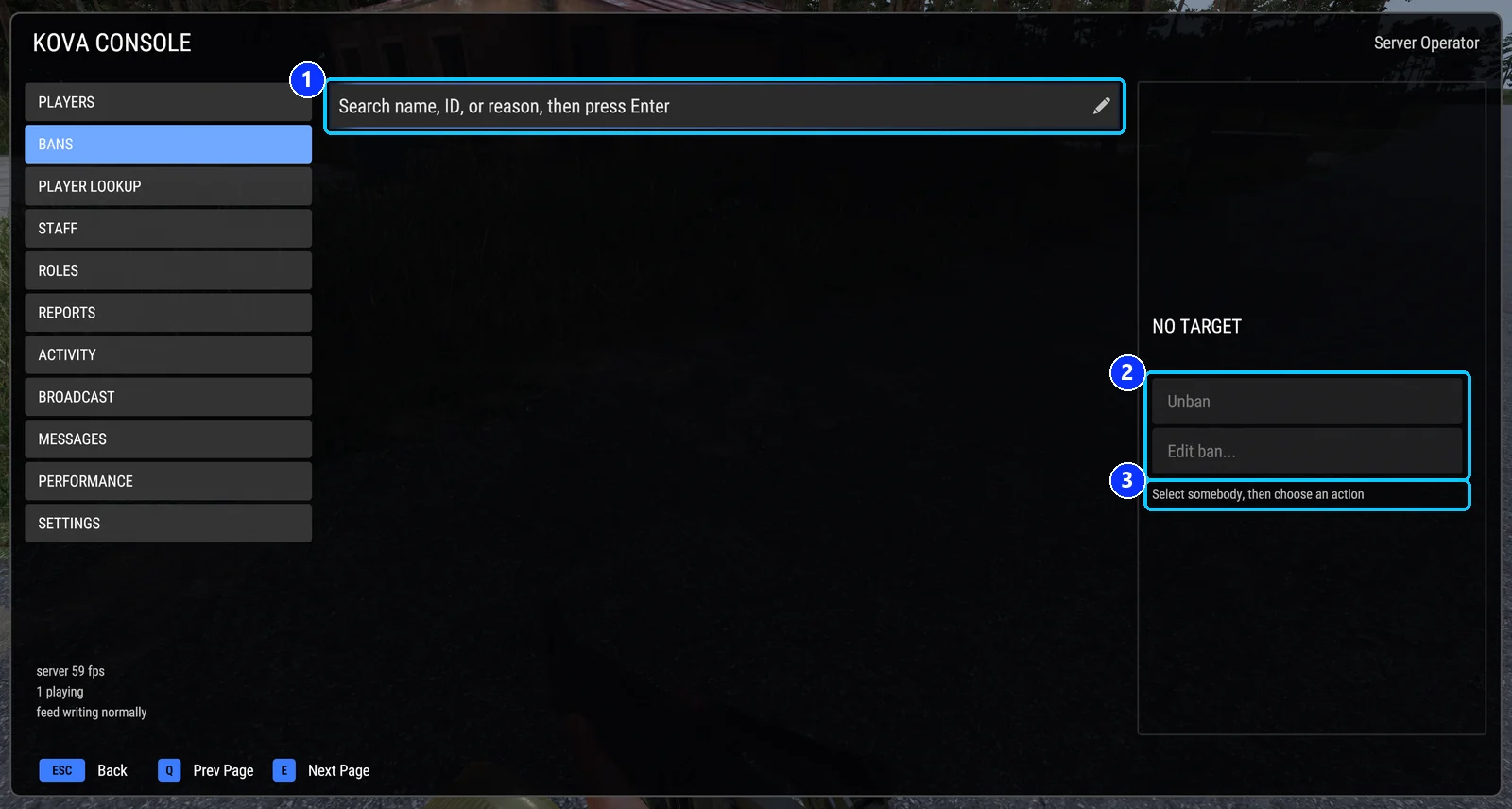
- Search by name, player ID or reason. Press Enter.
- Unban, and Edit ban... to change the reason or the length.
- The hint: why a greyed button is off, or what to do next.
| Button | Needs | What it does |
|---|---|---|
| Unban | Lift bans | Lifts the selected ban. |
| Edit ban… | Ban players | Changes the reason and, if you pick one, restarts the duration from now. |
Both are refused if the ban changed since you opened the page; refresh and try again. From chat: #kova unban <player ID>.
Jail
Jail holds a player at one spot. They stay there through respawn and reconnect until the time runs out or you release them.
Set the jail location first: stand where you want it and press Set jail location here on the Settings page, or type #kova jailpoint.
From chat: #kova jail 3 30 Repeated team killing for 30 minutes (1 to 1440). Release with the Release jail button or #kova release 3.
A jailed player who wanders more than 25 metres from the spot is pulled back (the jailRadiusMeters setting), and cannot be hurt while jailed (jailProtectsFromDamage).
Warning. If the saved location falls outside the map after a scenario change, jailing answers
The jail location is outside the map; set it again.
Player Lookup
Everyone the server has ever seen, online or not. Type any part of a name, a past name, or an exact player ID.
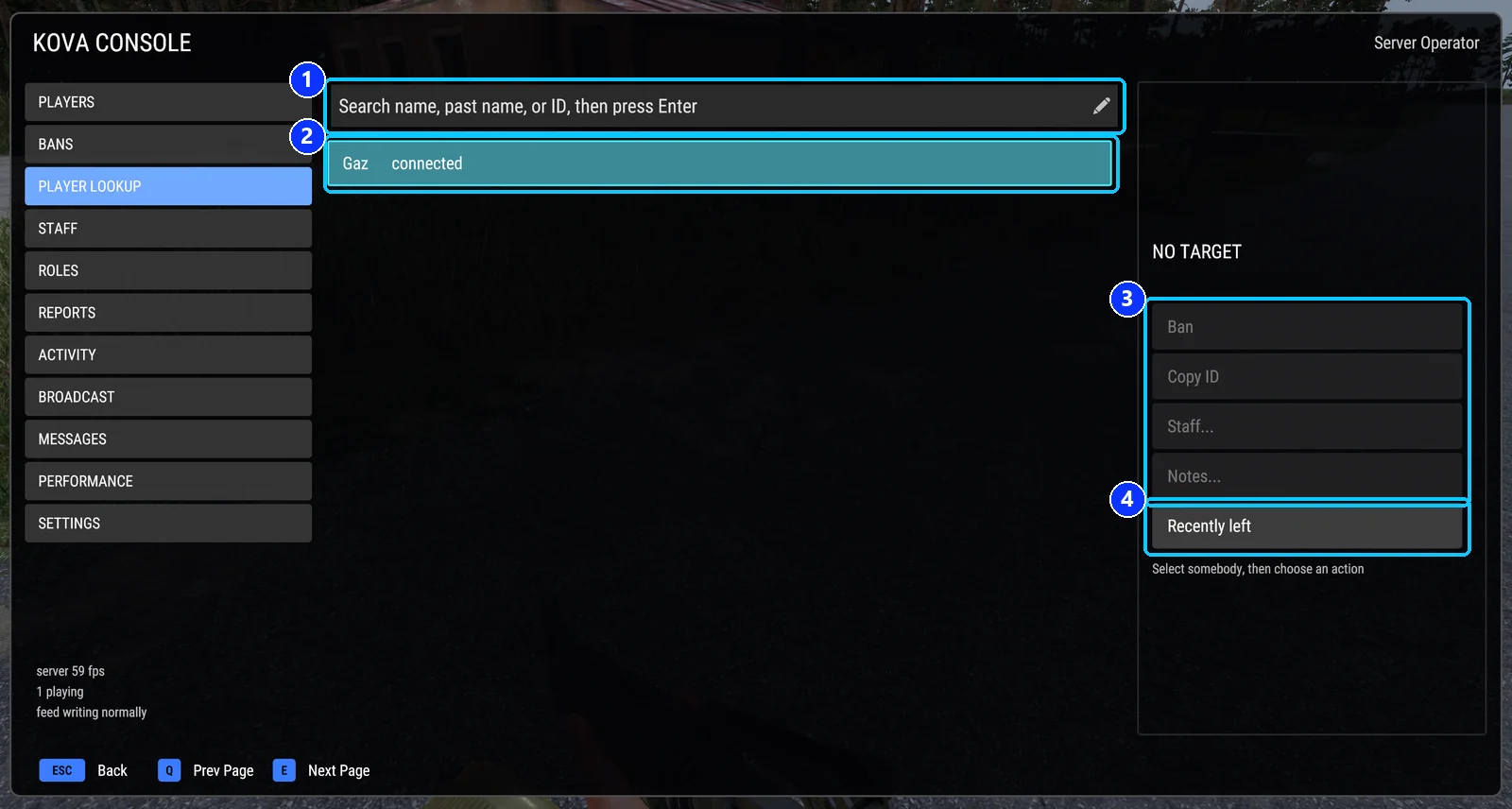
- Search by name, past name or player ID. Press Enter.
- A row: the name and whether the player is connected.
- Ban, Copy ID, Staff... and Notes... for the selected player.
- Recently left: show only players who left in the last while. Press again for everyone.
The card shows the player’s ID, why they hold any access, their first and last visit, how many visits, their platform, every name they have used, and, with the right permissions, their last ten decisions and the staff notes on them.
| Button | Needs | What it does |
|---|---|---|
| Ban | Ban players | Ban a player who is offline. |
| Copy ID | Read player records | Copies the player ID to the clipboard. |
| Staff… | See the staff list | Opens the Staff page with this player picked. |
| Notes… | Read and write player notes | Read, add and remove private notes. Up to 50 per player. |
| Recently left | Nothing | Switches between players seen in the last two hours and everyone on record. |
Search details
With nothing typed, the page lists players who left in the last two hours first, newest first, then the players online by name. It shows at most forty. An exact current name comes first, then names containing what you typed, then past names. Both the account name and the in-game name count, current and past. Typing #, < or > finds a name whether the player used those characters or the marks the game shows instead.
Covers KOVA Admin Tools 1.0.58. Updated October 6, 2026.