
Game Master
The editor is the most powerful thing on a server. Decide who gets it, for how long, and stop it fast when you need to.
On this page
Give Game Master
- Open Staff and select the player. If they are not staff yet, press Staff… on the Players page with them selected.
- Press Give Game Master….
- Pick how long: type
90m,12hor3dand press For the time typed, or press Until removed or This session.
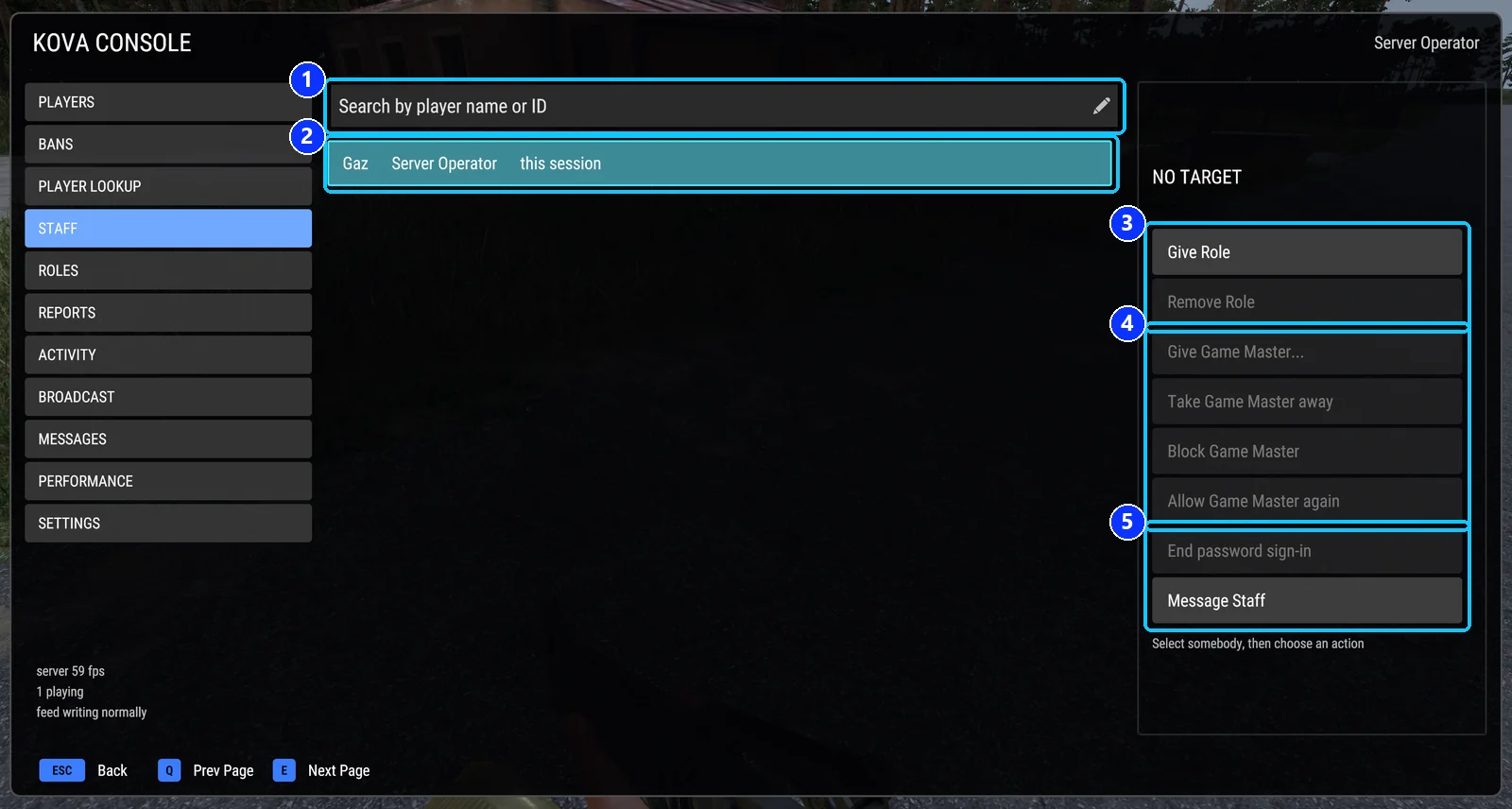
- Search by name or player ID.
- The selected staff member.
- Give Role and Remove Role.
- Give Game Master..., Take Game Master away, Block Game Master, Allow Game Master again.
- End password sign-in, and Message Staff.
From chat: #kova gm give 3 60 for sixty minutes, or #kova gm give 3 until somebody takes it away.
The player is placed in the Game Master role (gmGrantRole, which is gamemaster unless you change it) and the editor opens for them within a second.
A Game Master given with no end date survives a disconnect for five minutes, so a crash does not cost them the role.
Take it away
Select the player on Staff and press Take Game Master away, or type #kova gm take 3. It stops at once.
If they keep getting it back, they hold a role that carries Use Game Master, or Auto Game Master for admins is on and they are an admin. Remove the role, or block them.
Block a player
Block Game Master stops a player receiving Game Master by any route, role, vote or automatic grant, until you press Allow Game Master again. It works on a player who is offline and survives restarts. From chat: #kova gm block 3 and #kova gm unblock 3.
Who may give it
Giving needs Give Game Master. A role gets it in one of two ways: the word is in its permission list, or the role holds Game Master and everything else the Game Master role carries, and is ranked above it. A greyed button names the permission that is missing.
Warning. The hand-out role should carry only Game Master powers. If you point
gmGrantRoleat a role that carries more, such as your Admin role, the mod refuses it, usesgamemasterinstead, and says so in the server log and the panel.
The switches on the Settings page
| Switch | What it does |
|---|---|
| Auto Game Master for admins | Admins whose role carries Use Game Master get the editor when they join. Off by default. |
| Allow voting into Game Master | Off, players cannot vote themselves in. |
| Allow voting Game Masters out | Off, players cannot vote one out. A vote never removes a Game Master whose role entitles them to it. |
| Pause Game Masters… | The emergency stop, below. |
| Toggle my GM badge | Hides the eye beside your own name in the player list. Your powers are unchanged. |
Tip. Pause Game Masters… stops every Game Master placing anything, and stops anyone new being given or voted in, until you press Resume or the server restarts. Use it when a Game Master is wrecking the server and you need a moment to sort out who.
Keeping a busy server safe
gmPlacementSpacingMs (3000 by default) makes a Game Master wait that many milliseconds between group or vehicle spawns, so one person cannot flood the server. Set it to 0 to switch it off.
Everything a Game Master places, and everything they do to a player, is written to the activity record under the Game Master placements and Game Master actions on players switches.
What the game does on its own
A player who signs in with the server admin password gets the game’s own administrator editor, which the mod records but does not control. The game tells every Game Master when another player loses Game Master. And the game assigns the role a moment before the mod can see it, so a blocked player who wins a vote holds it for up to a second before it is taken back.
Covers KOVA Admin Tools 1.0.58. Updated October 6, 2026.